Tracer
Get started
Quickstart
Install HealOps and run your first alert investigation.
Connect integrations
Wire HealOps into observability, incident, code, and data systems.
Run an investigation
See how HealOps gathers evidence and produces root cause analysis.
Start here
Investigations
Alert ingestion, evidence collection, masking, and remote runtime workflows.
Monitoring
Workflow monitoring, tutorials, framework support, and operational use cases.
Platform
HealOps architecture, product capabilities, deployment targets, and comparisons.
Daily updates
Follow product progress and recent documentation changes.
What it does
HealOps enables teams to resolve incidents quickly without sacrificing fix quality or team capacity. With HealOps, you can:- Stop investigating, start fixing. When an alert fires, HealOps immediately pulls context from your observability tools, infrastructure, and knowledge bases. It checks recent deploys, queries logs and metrics, builds multiple root cause hypotheses, and tests them in parallel. By the time you open your laptop, you already know what broke and why.
- Ship the right fix, not the fast one. When you’re on-call and the pressure’s on, you ship the patch that makes the alert go away. HealOps takes investigation off your plate so you have the time and context to fix the actual problem instead of papering over it.
- Give everyone the context that’s usually stuck in one person’s head. Complex systems often need the engineer who built them to debug them. HealOps surfaces the same depth of analysis – what failed, what changed, what caused the cascade – so whoever’s on-call can understand root cause without needing to page the one person who just knows.
How it works
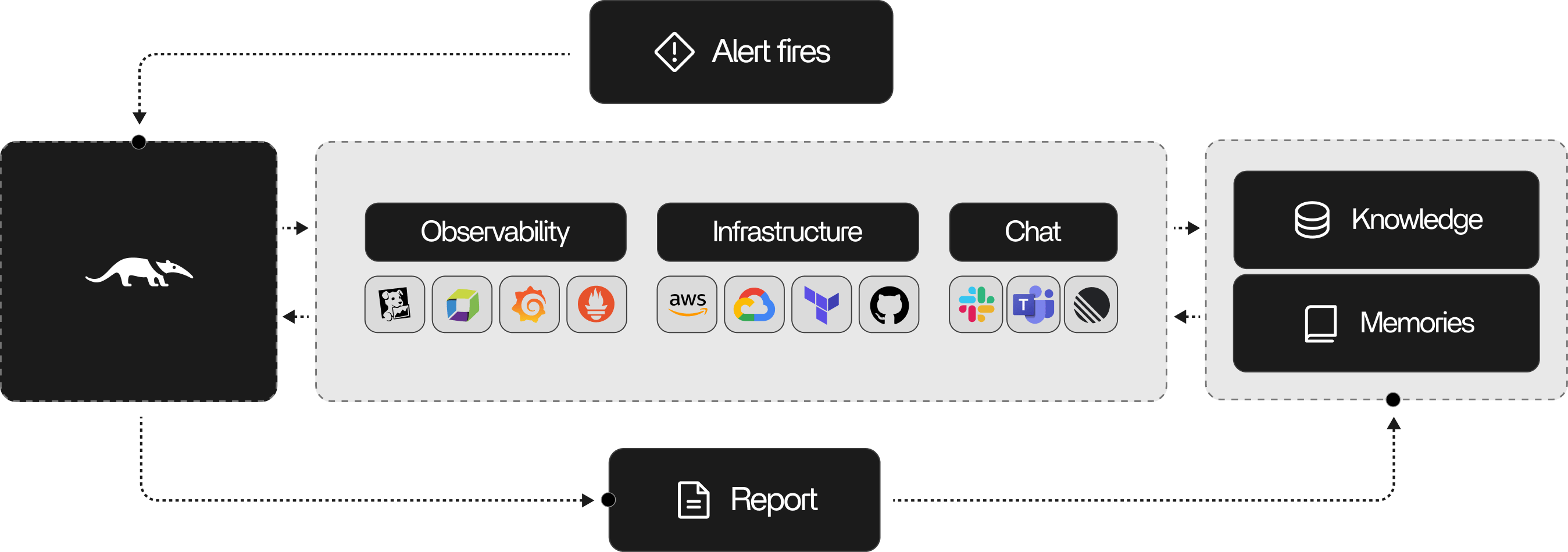
When an alert fires, HealOps autonomously:- Ingests the alert. Picks up alerts from your metrics, logs, traces, or incident systems and normalizes them into a single investigation.
- Assembles context. Pulls in service ownership, dependencies, recent deploys, config changes, and baselines.
- Frames the problem. Identifies impacted components, plausible failure modes, and investigation objectives.
- Investigates in a loop. Plans queries, executes them against your observability and production tooling, and synthesizes evidence into evolving hypotheses.
- Decides when to stop. Evaluates hypothesis confidence, remaining uncertainty, and whether further investigation is likely to change the outcome.
- Delivers a report. Sends likely root causes, supporting evidence, and recommended next actions to Slack, PagerDuty, or wherever your team communicates.
Investigation workflow