> ## Documentation Index
> Fetch the complete documentation index at: https://docs.healops.ai/llms.txt
> Use this file to discover all available pages before exploring further.
# Integrations overview
HealOps investigates alerts by querying the same tools your engineers use. Connect your stack so HealOps can pull logs, check recent deploys, map dependencies, and deliver findings where your team already works.
## Before you begin
Make sure you have:
* A HealOps account — you can create one at [app.healops.ai/sign-up](https://app.healops.ai/sign-up)
* Access credentials for the tools you want to connect
* Permissions to create API keys
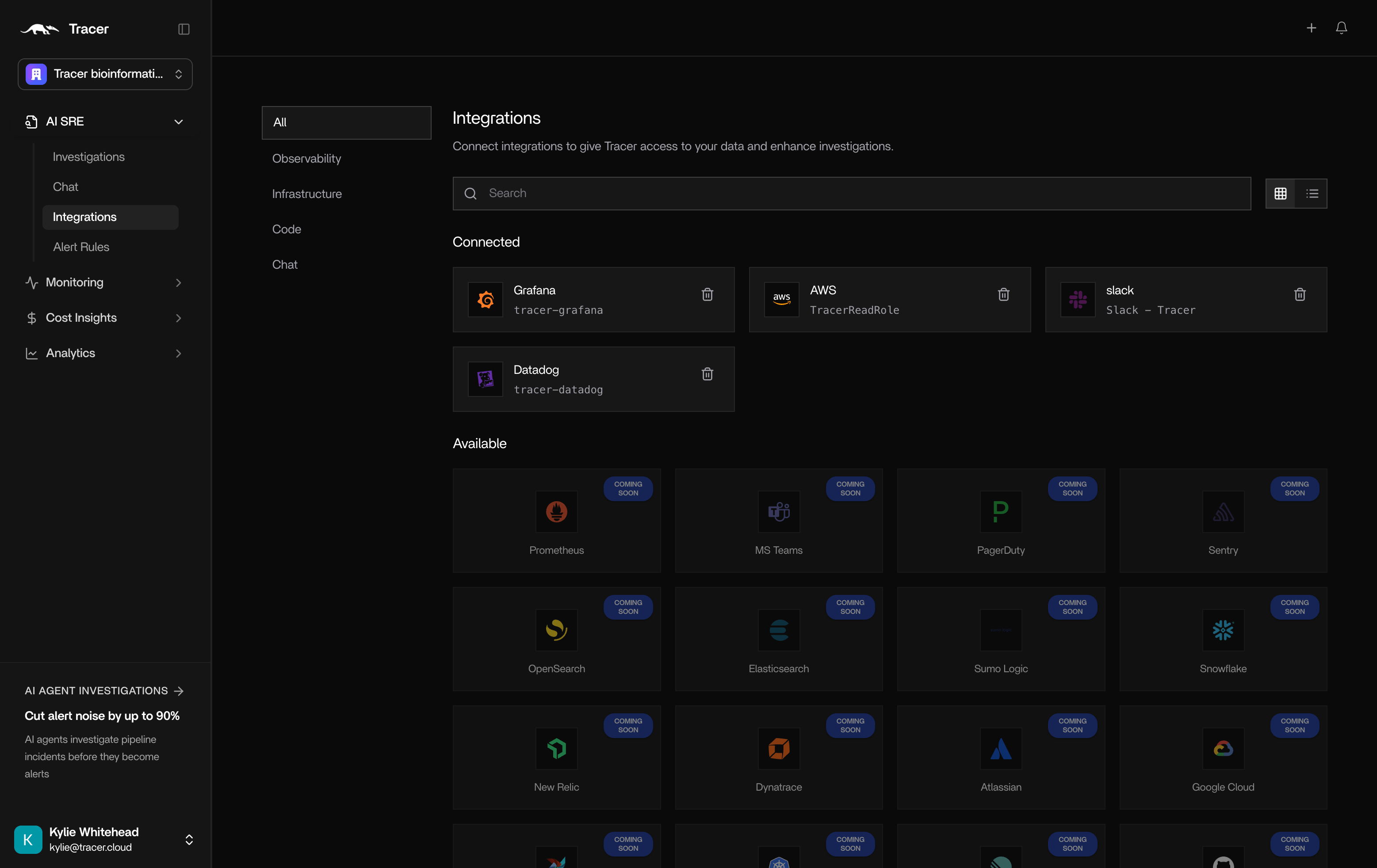
## Enterprise integrations
Enterprise integrations are configured through the HealOps web app at [app.healops.ai](https://app.healops.ai). Once connected, they are available to all users in your organization.
**Observability.** HealOps reads your logs, metrics, traces, and alerts to build investigation hypotheses. Connect [Grafana](/grafana) and [Datadog](/datadog).
**Infrastructure.** HealOps maps your environment and dependencies across clouds and clusters. Connect [AWS](/aws).
**Communication.** HealOps delivers investigation reports where your team already works. Connect [Slack, Discord, or Telegram](/messaging/index).
 ### Configure enterprise integrations
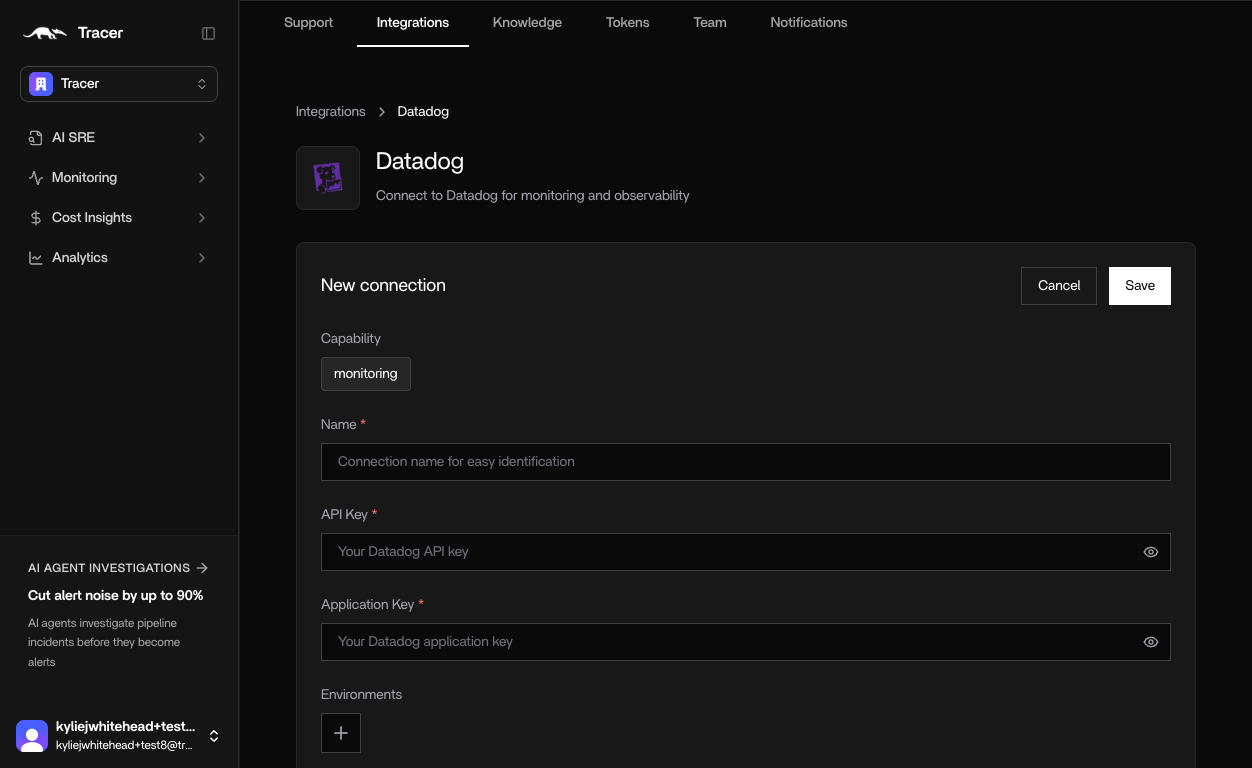
Each integration follows a simple, guided flow. Let's look at Datadog as an example.
1. Name - Helps distinguish between different instances
2. API Key - in Datadog, create a new API key and copy and paste into HealOps.
3. Application Key - In Datadog, create a new Application Key and copy and paste into HealOps.
### Configure enterprise integrations
Each integration follows a simple, guided flow. Let's look at Datadog as an example.
1. Name - Helps distinguish between different instances
2. API Key - in Datadog, create a new API key and copy and paste into HealOps.
3. Application Key - In Datadog, create a new Application Key and copy and paste into HealOps.
 ## Local integrations
Local integrations are configured on the machine running HealOps — via the CLI setup wizard or environment variables. They give HealOps access to your databases, source control, error trackers, and workflow tools.
```bash theme={null}
healops integrations setup
```
Or set environment variables and HealOps picks them up automatically.
| Category | Integrations |
| ----------------------- | ------------------------------------------------------------------------------------------------- |
| **Observability** | [Better Stack](/betterstack), [Honeycomb](/honeycomb), [Coralogix](/coralogix), [Sentry](/sentry) |
| **Databases** | [MongoDB](/mongodb), [MariaDB](/mariadb), [ClickHouse](/clickhouse), [Kafka](/kafka) |
| **Source control** | [GitHub](/github), [GitLab](/gitlab), [Bitbucket](/bitbucket) |
| **Kubernetes releases** | [Helm](/helm) |
| **Deployments** | [Vercel](/vercel) |
| **Orchestration** | [Prefect](/prefect) |
| **Incident management** | [OpsGenie](/opsgenie), [Jira](/jira) |
| **Reporting** | [Google Docs](/google-docs) |
### Verify local integrations
After setup, confirm everything is working:
```bash theme={null}
healops integrations verify
```
To check a specific integration:
```bash theme={null}
healops integrations verify mongodb
```
## Setup guides
* [Connect integrations from the web app](/connect-integrations) — step-by-step for the HealOps dashboard integration page
* [CLI Integration Setup](/cli-integration-setup) — step-by-step for local and on-prem CLI setup
## Local integrations
Local integrations are configured on the machine running HealOps — via the CLI setup wizard or environment variables. They give HealOps access to your databases, source control, error trackers, and workflow tools.
```bash theme={null}
healops integrations setup
```
Or set environment variables and HealOps picks them up automatically.
| Category | Integrations |
| ----------------------- | ------------------------------------------------------------------------------------------------- |
| **Observability** | [Better Stack](/betterstack), [Honeycomb](/honeycomb), [Coralogix](/coralogix), [Sentry](/sentry) |
| **Databases** | [MongoDB](/mongodb), [MariaDB](/mariadb), [ClickHouse](/clickhouse), [Kafka](/kafka) |
| **Source control** | [GitHub](/github), [GitLab](/gitlab), [Bitbucket](/bitbucket) |
| **Kubernetes releases** | [Helm](/helm) |
| **Deployments** | [Vercel](/vercel) |
| **Orchestration** | [Prefect](/prefect) |
| **Incident management** | [OpsGenie](/opsgenie), [Jira](/jira) |
| **Reporting** | [Google Docs](/google-docs) |
### Verify local integrations
After setup, confirm everything is working:
```bash theme={null}
healops integrations verify
```
To check a specific integration:
```bash theme={null}
healops integrations verify mongodb
```
## Setup guides
* [Connect integrations from the web app](/connect-integrations) — step-by-step for the HealOps dashboard integration page
* [CLI Integration Setup](/cli-integration-setup) — step-by-step for local and on-prem CLI setup