> ## Documentation Index
> Fetch the complete documentation index at: https://docs.healops.ai/llms.txt
> Use this file to discover all available pages before exploring further.
# Connect integrations
> How to connect your tools to HealOps from the web app integration page
HealOps connects to your stack in two ways depending on where the tool lives. This page explains both paths.
***
## Web app integrations (app.healops.ai)
Enterprise and SaaS integrations are configured directly from the HealOps web app. No CLI required.
### Step 1 — Open the Integrations page
Sign in at [app.healops.ai](https://app.healops.ai) and click **Integrations** in the left sidebar.
The page shows every available integration with a connection badge:
| Badge | Meaning |
| ------------------ | --------------------------------------------------- |
| **Connected** | Credentials are saved and the health check passed |
| **Auth error** | Credentials are saved but authentication is failing |
| **Not configured** | No credentials saved yet |
### Step 2 — Expand an integration card
Click any integration card to expand it. Each card shows:
* A link to the provider-specific setup guide (opens in a new tab)
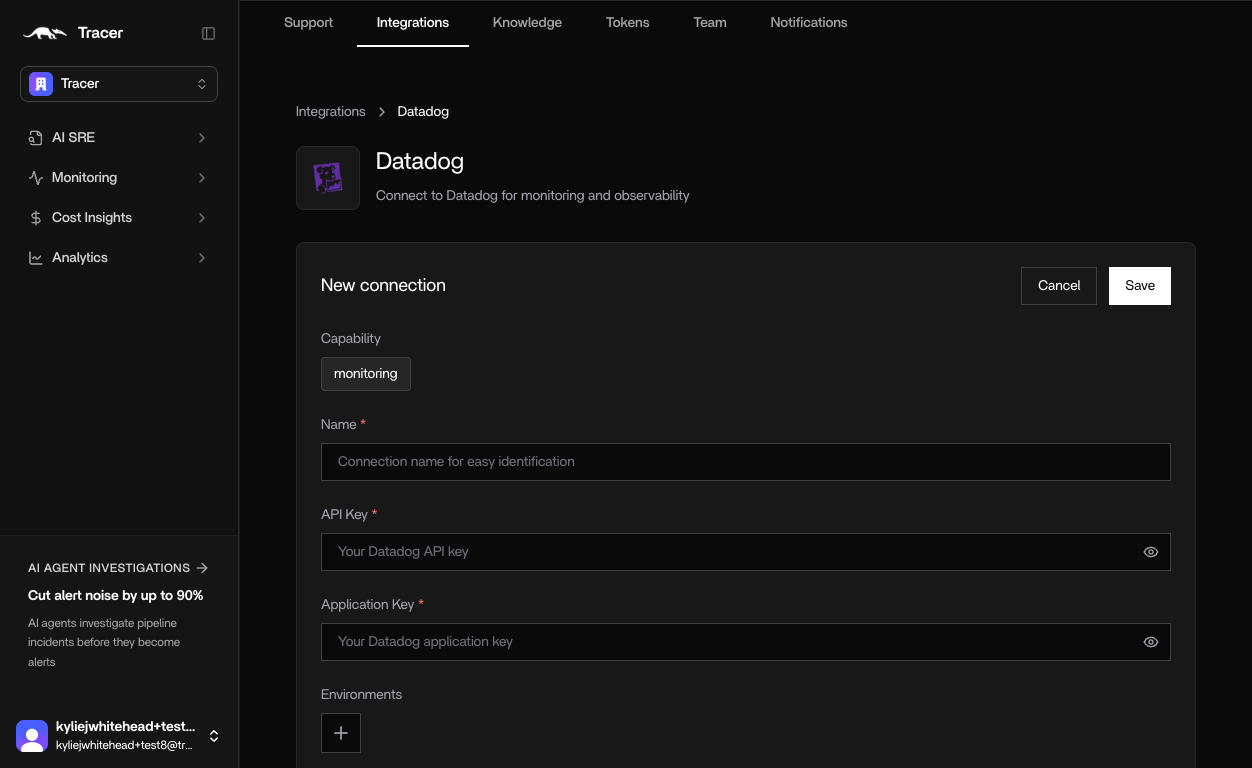
* Input fields for the required credentials (API keys, tokens, etc.)
### Step 3 — Paste your credentials
Enter your API key, application key, or token in the fields. Field labels are named after the values shown in each provider's dashboard. The setup guide link in the card walks you through where to find them.
 ### Step 4 — Save
Click **Save credentials**. HealOps:
1. Stores the credentials encrypted in AWS Secrets Manager, scoped to your organization.
2. Runs a live health check against the provider.
3. Updates the badge to **Connected** if the check passes.
### Step 5 — Refresh health at any time
Click **Refresh health** at the top of the page to re-run health checks across all saved integrations without re-entering credentials.
***
## CLI integrations (local / on-prem)
Some integrations — databases, source control, internal tooling — run alongside the HealOps agent on the same host. These are configured via the CLI.
### Set up from the CLI
```bash theme={null}
healops integrations setup
```
This opens an interactive wizard. To set up one integration directly:
```bash theme={null}
healops integrations setup mongodb
healops integrations setup kubernetes
healops integrations setup github
```
### Verify connectivity
```bash theme={null}
healops integrations verify
```
To check one integration:
```bash theme={null}
healops integrations verify mongodb
```
The full list of CLI-managed integrations appears in the **Configure via CLI** section of the Integrations page at [app.healops.ai/integrations](https://app.healops.ai/integrations). Each entry links directly to the setup guide for that integration.
***
## Which path does each integration use?
| Integration | How to connect |
| ---------------------------- | ------------------------------------------ |
| Datadog | Web app |
| Grafana | Web app |
| AWS | Web app |
| Slack / Discord / Telegram | Web app |
| OpsGenie | Web app |
| Sentry | Web app |
| Azure Monitor | Web app |
| MongoDB | CLI (`healops integrations setup mongodb`) |
| PostgreSQL / MySQL / MariaDB | CLI |
| Kubernetes | CLI |
| GitHub / GitLab / Bitbucket | CLI |
| Kafka / RabbitMQ | CLI |
| Vercel | CLI |
| Jira | CLI |
| Prefect | CLI |
| Google Docs | CLI |
***
## Related guides
* [CLI Integration Setup](/cli-integration-setup) — detailed CLI setup walkthrough
* [Integrations overview](/integrations-overview) — full integration catalog with environment variable reference
* [Quickstart](/quickstart) — install HealOps and run your first investigation
### Step 4 — Save
Click **Save credentials**. HealOps:
1. Stores the credentials encrypted in AWS Secrets Manager, scoped to your organization.
2. Runs a live health check against the provider.
3. Updates the badge to **Connected** if the check passes.
### Step 5 — Refresh health at any time
Click **Refresh health** at the top of the page to re-run health checks across all saved integrations without re-entering credentials.
***
## CLI integrations (local / on-prem)
Some integrations — databases, source control, internal tooling — run alongside the HealOps agent on the same host. These are configured via the CLI.
### Set up from the CLI
```bash theme={null}
healops integrations setup
```
This opens an interactive wizard. To set up one integration directly:
```bash theme={null}
healops integrations setup mongodb
healops integrations setup kubernetes
healops integrations setup github
```
### Verify connectivity
```bash theme={null}
healops integrations verify
```
To check one integration:
```bash theme={null}
healops integrations verify mongodb
```
The full list of CLI-managed integrations appears in the **Configure via CLI** section of the Integrations page at [app.healops.ai/integrations](https://app.healops.ai/integrations). Each entry links directly to the setup guide for that integration.
***
## Which path does each integration use?
| Integration | How to connect |
| ---------------------------- | ------------------------------------------ |
| Datadog | Web app |
| Grafana | Web app |
| AWS | Web app |
| Slack / Discord / Telegram | Web app |
| OpsGenie | Web app |
| Sentry | Web app |
| Azure Monitor | Web app |
| MongoDB | CLI (`healops integrations setup mongodb`) |
| PostgreSQL / MySQL / MariaDB | CLI |
| Kubernetes | CLI |
| GitHub / GitLab / Bitbucket | CLI |
| Kafka / RabbitMQ | CLI |
| Vercel | CLI |
| Jira | CLI |
| Prefect | CLI |
| Google Docs | CLI |
***
## Related guides
* [CLI Integration Setup](/cli-integration-setup) — detailed CLI setup walkthrough
* [Integrations overview](/integrations-overview) — full integration catalog with environment variable reference
* [Quickstart](/quickstart) — install HealOps and run your first investigation